
Why Data Security is the Cornerstone of Modern Enterprise Software Development
Picture this. It's 2am, your phone buzzes, and the first line you read is "we've found unusual activity in the customer database." That sinking feeling? It costs real money.
$10.22 million: the record average cost of a data breach for U.S. organizations in 2025.
That number comes from IBM's 2025 Cost of a Data Breach Report, which also put the global average at $4.44 million. Breaches that took more than 200 days to find and contain ran about $5.01 million, compared with $3.87 million for faster fixes. So speed matters. A lot.
Security Isn't Just an IT Problem Anymore
Here's what I keep hearing from technology leaders: the board doesn't ask about firewalls. They ask about revenue, reputation and whether customers will stay. And they're right to ask.
One leaked customer file can stall a sales deal, spook an investor or trigger a regulator's letter. Trust takes years to build and about one headline to lose. That's why enterprise software development now sits right in the middle of business risk, not off to the side.
The old playbook was simple: detect, patch, respond, repeat. A 2026 CSO Online analysis argues that this loop isn't enough anymore. Waiting for attackers to get a foothold means you're already behind.
Where Problems Start
Many flaws show up early. Veracode's data found that nearly 32% of applications had at least one security flaw at their first scan. That tells us something simple (and a bit uncomfortable): weaknesses are often baked in before a single customer logs in.
What This Guide Will Give You
So what's the plan? This article is a practical framework for CTOs and IT leaders who want to build security into every stage of the software lifecycle, from the first design meeting to the last patch. We'll cover secure coding practices, a secure software development lifecycle (SSDLC), compliance and legacy system security, with steps you can start on this quarter.
First, let's look at what you're actually up against in 2026.
The Evolving Threat Landscape: New Risks for Enterprise Applications in 2026

Malware used to be the villain everyone pictured. One shady email, one bad attachment, game over. Today's attackers are sneakier. They go after the parts of your software you never think twice about.
Attacks That Skip the Front Door
Cloud setups, APIs and software packages are now favorite targets. Google Threat Intelligence Group reported that the TeamPCP campaigns hit npm, PyPI and Docker Hub from February through May 2026. Think about that. Attackers don't have to break into you if they can slip something bad into code you download yourself.
And the damage spreads fast. The Identity Theft Resource Center counted 38 supply-chain breach events in the first half of 2026, affecting 206 entities and producing 280.6 million victim notices. One weak supplier, a whole lot of victims.
Here's a quick look at the attack paths showing up most in recent research:
Attack path | How it works | Why your team feels it |
Supply chain | Bad code hides in packages, build tools or CI/CD workflows | One update can reach thousands of projects |
Cloud misconfiguration | Open storage, extra permissions, exposed secrets | Attackers move from one app into your whole cloud |
APIs and identity | Stolen keys, tokens and overpowered service accounts | They hop between services without much noise |
AI models and data | Poisoned data or tampered models | Wrong answers, leaked information |
Legacy connections | Old systems linked to new ones | Gaps nobody planned for |
AI Opens New Doors
Adding AI to enterprise software is exciting. It also adds risk. IBM found that 13% of organizations reported breaches of AI models or applications, and 97% of those lacked proper AI access controls.
Two attacks are worth knowing by name. Data poisoning means sneaking bad examples into training data, so the model learns the wrong lesson. Model inversion is trickier: an attacker asks clever questions until the model gives up private details it learned during training. Nobody wants their customer records coming back out of a chatbot.
Plus, the models themselves can be traps. JFrog's 2026 research flagged 495 malicious Hugging Face models. So treat a downloaded model like any other package: scan it, check where it came from and limit who can touch it.
When Old Systems Meet New Tools
Here's where it gets messy. Most enterprises don't rebuild everything at once. You bolt a shiny new API onto a 15-year-old system and hope the two get along.
They often don't. The old side speaks older rules, and the connector between them can become the weakest link. CISA's review found that 91% of reviewed entities relied on deprecated SSL/TLS protocols, with some insecure settings sitting untouched for a median of 459 days. That's more than a year.
So the real question isn't whether threats are changing. They are. It's whether your development process changes with them, and that's what we'll tackle next.
Shifting Left: Integrating Security into the DNA of Your Development Process

Think about adding locks to a house after the family has moved in. You can do it. It's just messier, pricier and a little embarrassing. Software works the same way.
Security by Design vs. the Old Gate at the End
"Security by design" means you think about threats from the very first sketch. Who could misuse this feature? What happens if this token leaks? "Shift left" is the practical side of that idea. Picture your project timeline running left to right, from planning to release. Shifting left just means moving security checks toward the start.
The old way looked different. Developers built for months, then a security team showed up a week before launch with a long list of problems. Deadlines were tight, so some got fixed and some got "accepted as risk." We've all been there. Nobody loves it.
Here's how the two models compare:
Aspect | Traditional late-stage model | Shift-left DevSecOps model |
When security looks at the code | Right before release | From the first design meeting |
Who finds problems | A separate security team | Developers, with automated checks |
Typical testing | One big scan or pen test | Scans on every pull request and build |
Fixing a flaw | Rework under deadline pressure | Small fix while the code is fresh |
Feedback loop | Weeks | Minutes or hours |
Who owns security | "The security people" | Everyone on the team |
What Fixing Early Actually Saves
A common rule of thumb says a defect costs about 100 times more to fix in production than at the requirements stage. One 2025 industry report on bug costs shows the pattern with sample numbers: roughly $100 at requirements, $600 while coding, $1,500 in testing and $10,000 in production. Those are estimates, not an accounting standard. Real costs swing with severity and whether you need emergency deployments or customer cleanup.
But the direction is clear. Early fixes are cheaper, faster and quieter. Nobody has to write a breach notice for a bug that never shipped.
NIST backs this thinking too. Its Secure Software Development Framework is built as a set of practices you fold into your existing lifecycle, not a separate project you bolt on.
One tip: don't judge success by how many security tools you bought. Track defects caught before release, how long fixes take, and how many vulnerabilities slip into production.
Turning Developers Into Security Owners
Tools are the easy part. The culture shift is harder (and honestly, it's where most programs stall).
DevSecOps means developers, operations and security share responsibility instead of passing it around. In practice, that looks like:
Security checks inside the tools developers already use, like code editors and pull requests
Automated scans that flag secrets and risky dependencies before code merges
"Security champions," meaning one developer per team who acts as the go-to person
Guardrails over gates, so safe choices are the easy choices
That last one matters. Netflix, for example, built internal tools like ConsoleMe so engineers could manage cloud permissions safely without filing a ticket every time. Security became part of the workflow, not a roadblock.
This also changes how security teams spend their time. Less policing, more coaching. And developers stop seeing security as the department that says no.
Need help building this into custom software? Buildera's engineers work with enterprise teams on exactly this kind of change. Next, let's get into what a secure lifecycle looks like step by step.
A Practical Guide to the Secure Software Development Lifecycle (SSDLC)
A secure software development lifecycle (SSDLC) sounds fancy. It isn't. It's just your normal build process with security checks tucked into each step, so nobody has to bolt them on at the end.
Let's walk through three phases: requirements and design, development, and testing. Pick one product and try this on it first. Don't boil the ocean.
Requirements and Design: Think Like the Attacker
This is the cheapest place to catch a problem. A sketch on a whiteboard doesn't have a bug yet. It only has a bad idea, and bad ideas are easy to erase.
Threat modeling with STRIDE and DREAD
Threat modeling is a fancy name for a simple chat: what are we building, what could go wrong, and what will we do about it? Two methods come up a lot.
STRIDE gives you six prompts: spoofing, tampering, repudiation, information disclosure, denial of service and elevation of privilege. Walk through your data-flow diagram and ask each one at every step.
DREAD helps you rank what you found. You score each threat on damage, reproducibility, exploitability, affected users and discoverability. Higher score, fix it first.
Need a tool? VerSprite's tool comparison lists free options like Microsoft Threat Modeling Tool and OWASP Threat Dragon, plus paid ones like IriusRisk and ThreatModeler. Teams that like "models as code" tend to pick Threagile.
Write security requirements next to feature requirements
Here's the trap. A ticket says "users can download invoices." Nobody writes "users can only download their own invoices." So someone forgets, and one customer sees another customer's data.
Fix it by adding a security line to every story. Examples:
Only the account owner can view this record
Personal data is encrypted when stored and when sent
Failed logins are logged and trigger an alert
Development: Make the Safe Way the Easy Way
Now the code gets written. Three habits do most of the work here.
First, agree on secure coding standards. The OWASP Top 10 is the usual starting list, and CERT coding standards help for specific languages. Keep it short. A 40-page rulebook gets ignored, but a one-page checklist in the pull request template gets used.
Second, run SAST. Static application security testing reads your code without running it. It flags things like injection risks and hard-coded passwords right inside the editor or the pull request. It can be noisy (false positives are real), so tune the rules early or developers will tune out.
Third, watch your open-source parts. Software composition analysis (SCA) lists every library you use and matches it against known flaws. It matters more than most teams expect. A 2026 ACM study scanned about 3.8 million library occurrences and found 11.72% had at least one known CVE. Pair SCA with an SBOM (a simple parts list for your software) so you know what's inside before the next big alert hits.
Testing and Verification: Try to Break It
Code that looks fine in review can still behave badly when it runs. That's where the next set of tests comes in. Infosec Train's comparison sums up the split well: SAST reads code, DAST attacks a running app, and IAST watches the app from the inside while tests run.
Here's how the tools line up:
Method | Purpose | Best lifecycle stage | Example tools |
SAST | Scans source code for insecure patterns and secrets | Coding, pull requests, CI builds | SonarQube, Veracode, Checkmarx |
SCA | Finds known flaws in open-source libraries and builds an SBOM | Coding and build, plus ongoing monitoring | Snyk, Black Duck, Syft with Grype |
DAST | Attacks a running app from the outside like a real intruder | QA, staging, pre-production | OWASP ZAP, Burp Suite, Invicti |
IAST | Watches code behavior and data flow during tests | Integration and automated testing | Contrast Security, Synopsys Seeker |
No single tool wins. Use them in layers. Each one catches things the others miss.
Where human testers still matter
Scanners are fast, but they don't think creatively. For your most critical apps (payments, health data, anything with customer records), schedule manual penetration testing. A skilled tester chains small issues into a real attack path, like using a weak permission check plus a leaked token. Do it before major releases and after big architecture changes.
Want a simple scorecard? Track how many flaws you catch before release, how long fixes take, and what slips through anyway. If you're building custom software and want a second pair of eyes on your pipeline, Buildera works with enterprise teams on exactly this.
Next up: what happens when regulators start asking how all this gets proven.
Navigating the Compliance Maze: Building Software for a Regulated World
Regulators don't read your code. But they will ask what your code does with people's data. And "we have a policy" won't cut it.
Here's the shift worth making: treat GDPR, HIPAA and CCPA as engineering requirements, not paperwork. If a rule can't be turned into something your software actually does, it's just a wish.
Turning Legal Rules Into Technical Controls
Let's make this concrete. Fines tend to follow the same few software failures. France's CNIL fined Nexpublica €1.7 million after users of its social-services software could open other people's sensitive documents. That's a broken access check, plain and simple. In the UK, the ICO fined Advanced Computer Software £3.07 million after a ransomware attack, citing missing MFA, weak vulnerability scanning and poor patching.
See the pattern? Each legal duty maps to a control you can build and test.
Regulatory duty | Technical control | Development practice |
GDPR Article 32 (secure processing) | Encryption, MFA, tenant isolation | Authorization tests on every release |
HIPAA safeguards for health data | Role-based access, audit logs | Centralized logging with alerts |
CCPA/GDPR deletion rights | Erasure workflows, retention timers | Delete jobs that reach backups, logs and analytics |
Breach notification | Real-time monitoring | Tested escalation and incident drills |
Sit your lawyer and a lead engineer in the same room. Ask the lawyer for the rule. Ask the engineer what proves it's met. Write that down as a ticket.
Privacy by Design: The Sibling of Security by Design
You already know security by design. Privacy by design is its close cousin. Instead of asking "who could attack this?", you ask "do we even need this data?"
Three habits do most of the work:
Data minimization. Collect fewer fields. Data you never store can't leak, and it can't land you in front of a regulator either.
Encryption. Protect personal data when it's stored and when it moves. Mask or tokenize records in test environments, because live customer data in staging is a classic mistake.
Consent management. Record who agreed to what and when, and make withdrawing consent as easy as giving it. Build correction and erasure into the product, not into a spreadsheet someone updates by hand.
One more thing people forget: retention. CNIL reportedly fined Mobius Solutions €1 million for keeping data after a contract ended. Set expiry dates on data from day one.
Automating Compliance Checks Inside CI/CD
Audits feel awful when you scramble for screenshots. They feel fine when evidence builds itself.
The trick is letting your pipeline do the paperwork. Every pull request already runs scans. Save those results, tie them to the control they prove, and you have an audit trail that never goes stale. A few ways to start:
Run SAST, dependency and secrets scans on every build, and keep the reports
Scan infrastructure-as-code so open storage or loose permissions fail the build
Send logs to one central place with alerts, since weak monitoring was a key finding in Sweden's fine against Miljödata
Use a GRC platform like Vanta or Sprinto to link technical findings to GDPR, SOC 2, ISO 27001 or HIPAA controls
A caution, though. Automation doesn't make you compliant on its own. Someone still has to check lawful processing, processor contracts and whether alerts lead to real fixes.
Top 5 Compliance Considerations for Your Next Project
# | Consideration | Quick question to ask |
1 | Access control | Can one customer ever see another's data? |
2 | Data minimization | Do we need every field we collect? |
3 | Encryption and MFA | Is personal data protected at rest, in transit and on admin accounts? |
4 | Retention and deletion | Does erasure reach backups, logs and test copies? |
5 | Evidence and monitoring | Can the pipeline prove each control without a scramble? |
If you're building custom software for a regulated industry, Buildera can help you wire these checks into your delivery process. Next, we'll look at the tricky part: old systems that were never built with any of this in mind.
Securing Legacy Systems: A Phased Modernization Approach
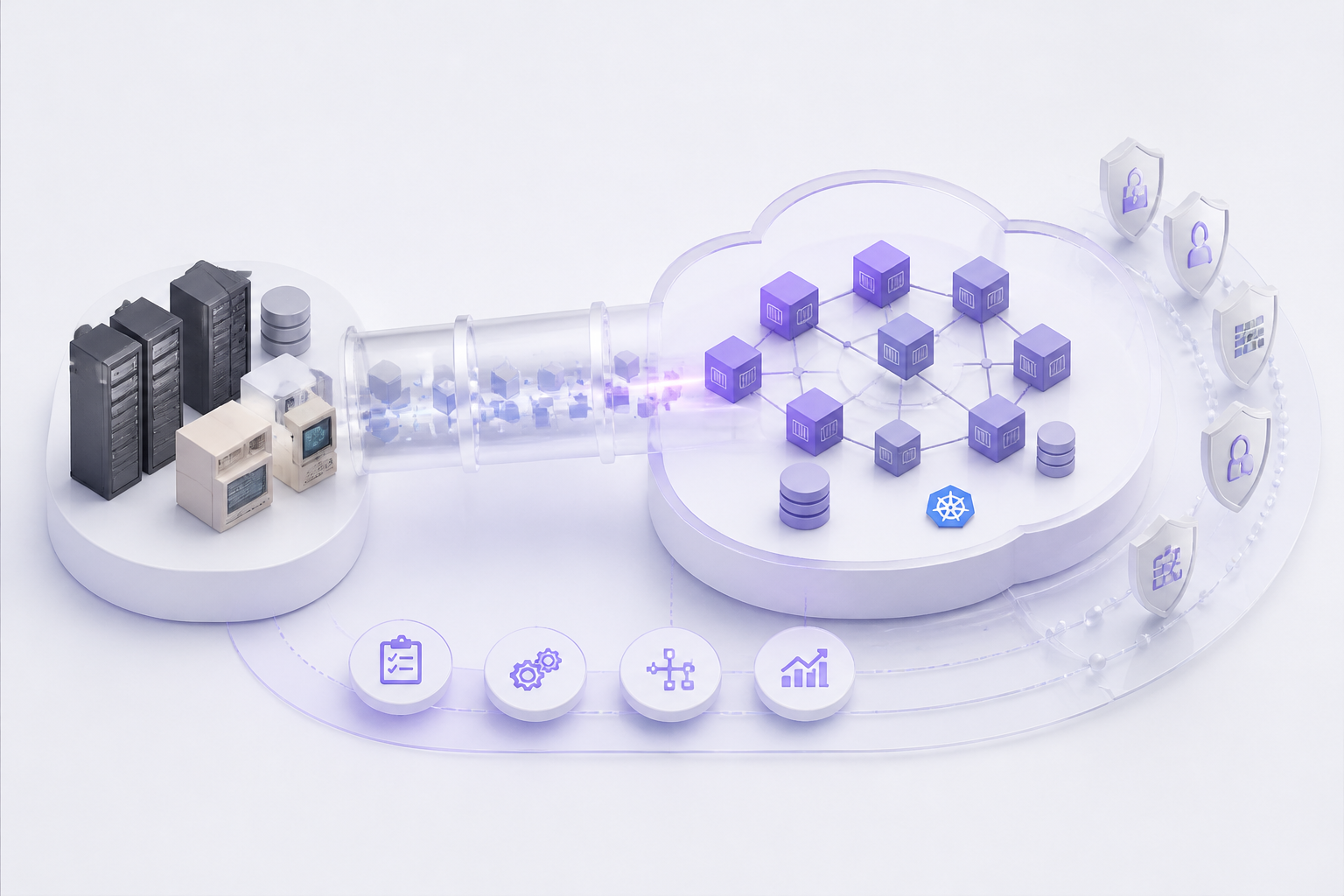
Here's the question I hear from CTOs more than any other: "What do we do about the old stuff we can't switch off?" That billing platform from 2009 still pays the bills. Ripping it out next quarter isn't happening.
Fair. But leaving it alone isn't safe either. Cisco Talos data reported by ARN found that 40% of the 100 most-targeted vulnerabilities hit end-of-life systems, the kind that can't get normal patches. So the goal is simple: shrink the risk now, then modernize in steps.
Wrap It First: Modern Armor Around Old Code
Wrapping means you don't touch the fragile core. You put modern controls around it instead. Think of bubble wrap, but with logging.
Web Application Firewall (WAF): Sits in front of the app and blocks common attacks like injection. It can also act as "virtual patching" when no real patch exists.
API gateway: Becomes the only front door. Old systems stop talking to the world directly, and every call gets authenticated, rate-limited and logged.
Network segmentation: Keeps the old database away from user networks and admin consoles.
MFA and a secrets vault: Replace shared admin passwords and hard-coded credentials, which old systems love.
It isn't glamorous. It's also a lot faster than a rewrite, and it buys you time (sometimes years).
A Security-First Roadmap
Wrapping is the first move, not the finish line. Here's how the phases fit together, read top to bottom like a flowchart:
Phase | What you do | Security win |
|---|---|---|
1. Assess | Inventory versions, dependencies, service accounts, open ports and data flows | You finally know what you're protecting |
2. Wrap | Add WAF, API gateway, segmentation and MFA | Attack surface shrinks fast |
3. Strangle | Move one function at a time into new, secure services | Risk drops with each piece retired |
4. Migrate data | Classify, encrypt, mask, verify and rehearse | Sensitive data stays protected in transit |
5. Retire | Switch off old parts only after tests pass | Nothing risky is left running |
The Strangler Fig in Practice
The strangler fig pattern gets its name from a vine that grows around a tree until the tree is gone. In software, your API gateway routes some requests to new services and the rest to the old system. Each release moves a little more traffic over. Eventually the old code has nothing left to do.
A Cognizant case study shows the idea at work. A manufacturer rearchitected monolithic apps into microservices on Amazon EKS, with tighter user privileges and automated maintenance. (The study doesn't publish audited breach numbers, so take it as a direction, not a guarantee.)
Start with the riskiest or most-changed function. And build cloud-native controls into each new service from day one: least-privilege identities, encrypted storage and central logging.
Moving the Data Safely
Data migration is where good projects trip. AWS migration guidance recommends encrypting data in transit and using checksums to catch tampering. Also mask sensitive records in test copies, give migration tools only the permissions they need, and rehearse the cutover with a backup you've actually restored.
Buildera helps enterprise teams plan this kind of phased modernization without betting the business on one big rewrite. Next, we'll pull everything together into a leadership playbook.
Building Your Digital Fortress: Key Takeaways for Proactive Security Leadership
Here's the short version. Security isn't a gate at the end of enterprise software development anymore. It's part of what makes the product good. A system that leaks data, breaks audits or can't be patched isn't a quality system, no matter how pretty the interface looks.
And that's where the edge comes from. Buyers ask harder questions now. Teams that can show clean pipelines, tested controls and clear audit evidence tend to win deals that others stall on. Trust, as we said at the start, takes years to build. You get to decide how it's earned.
You don't need a giant program to begin, though. Pick one product. Start small. Then keep going.
Actionable Steps for Your Next Quarter
- Month 1: Look at what you have. Run a threat modeling workshop on your next project, using STRIDE to find problems and DREAD to rank them.
- Month 1: Audit your open-source dependencies. Build an SBOM and scan it, so the next big alert doesn't catch you guessing.
- Month 2: Add security lines to every user story. Include one line on who can see what, and one on how personal data is protected.
- Month 2: Put scanners into your pipeline. Turn on SAST, dependency and secrets checks for pull requests, and tune the noisy rules early.
- Month 2: Name a security champion on each team. One person, one go-to, no new department.
- Month 3: Wrap your riskiest legacy system. Add MFA, segmentation and an API gateway before you plan any rewrite.
- Month 3: Map compliance rules to tickets. Ask your lawyer for the rule and your engineer for the proof.
- Month 3: Pick three numbers to track. Defects caught before release, time to fix, and flaws that slipped into production.
You won't finish all of this in 90 days (honestly, nobody does). But even half of it moves you from reacting to leading.
Where Development and Security Go From Here
The best teams I hear about don't treat security and development as two camps. They share the same backlog, the same dashboards and the same wins. Threats keep changing, especially with AI in the mix, so that partnership has to keep changing too.
If you'd like a hand, Buildera builds and modernizes custom software for enterprise teams, with security baked in from the first design meeting. Have a look at Buildera and see whether a conversation makes sense for your next project.
Ready to build software that actually works for your business?
Free discovery call · 15 minutes · No obligation