
The Modernization Dilemma: Balancing Innovation with Operational Stability
You know that sinking feeling when the board asks for an AI roadmap, and your team is still patching a system older than some of your interns? Yeah. Me too, in a secondhand sort of way.
Here's the core problem. Your legacy systems still run the business. They process the orders, store the records and keep the lights on. But they also eat budget and slow down every new idea.
Take the U.S. government as a public example. The GAO says agencies planned to spend about $83 billion of $105 billion on operations and maintenance in fiscal year 2025. The GAO report also links aging systems to "increased costs and cybersecurity vulnerabilities." It's not a private-sector number, but the pattern looks familiar to a lot of CTOs.
79%
of planned U.S. federal IT spending in fiscal year 2025 went to operations and maintenance, leaving roughly 21% for development, modernization and enhancement.
So what do you do? Rip it all out and start fresh? That's risky, expensive and, honestly, pretty scary when the old system is what pays the bills.
There's a middle path. Think of integration as a bridge, not a patch. A bridge lets your trusted core keep running while new apps, data tools and cloud services connect to it. No big-bang replacement. No holding your breath on go-live weekend.
This guide walks through the strategy, the architecture choices, the risks and the role of custom enterprise software development. Buildera helps teams with exactly this kind of work, and we'll point to what actually works along the way.
Let's start with why standing still costs more than most budgets show.
Why Integration is Non-Negotiable: The Business Cost of Stagnation

Doing nothing feels free. It isn't. Technical debt works a lot like a credit card balance, and the interest compounds while you're busy with other things.
The Money Keeps Leaking
Most leaders already know the old stack is a problem. Forrester's 2026 Enterprise Applications Software Survey found that 37% of enterprise application decision-makers are pursuing roadmaps to modernize all their core legacy systems. But 19% also named replacement cost as one of the biggest obstacles to their software strategy. So everyone wants out, and everyone is nervous about the bill.
Meanwhile, the quiet costs pile up. Patches take longer. Workarounds multiply. And the people who really understand your older code? They're retiring, or they've moved on. From what I've seen, finding engineers who know COBOL or ancient Java versions gets harder and pricier every year. That's a real hiring problem, and it hits hardest when the one person who knows the system is on vacation.
Security Holes and Brand Damage
Old, unsupported software often stops getting patches. That leaves doors open. Verizon's 2025 Data Breach Investigations Report found that vulnerability exploitation started 20% of breaches, up 34% from the year before. And IBM's Cost of a Data Breach Report 2025 puts the global average breach at $4.44 million.
Now, a fair warning. Neither report isolates the cost of legacy software alone, so don't treat $4.44 million as your exact number. Still, it's a useful yardstick.
The bigger hit is often trust. Customers don't care which server got breached. They just remember your name in the headline.
When Old Systems Hold Back Customers and AI
This is where stagnation shows up on the P&L. Gartner's H2 2025 CIO report says 47% of applications have technical or business-fit problems, including outdated technology and inefficient workflows. In plain terms, that means:
Customers repeat themselves because systems don't share data.
New features take months, not weeks, because every change touches something fragile.
AI and machine learning projects stall, since models need clean, connected data and yours is stuck in silos.
Any serious enterprise software development plan has to deal with this. Here's how the snowball tends to grow:
Stage | Costs | Agility | Security risk |
|---|---|---|---|
Year 1 | Maintenance feels manageable | Small delays on new features | A few unpatched components |
Year 3 | Workarounds and contractor fees climb | Releases slow down, teams avoid risky changes | Unsupported software spreads |
Year 5+ | Maintenance crowds out new projects | AI and data goals get shelved | Breach odds and cleanup costs rise |
That table is a pattern, not a measured forecast. But if it looks familiar, you're not alone. Next, let's look at where to start fixing it.
Phase 1: Conducting a Strategic Legacy System Audit

Before you connect anything, you need to know what you've got. Sounds obvious. But it's the step teams rush most, and it's where a lot of projects quietly go wrong.
Think of it like moving house. You wouldn't hire movers without walking through the attic first. (Trust me, there's always something weird up there.)
Step 1: Map What Actually Exists
Start with a plain inventory. For every application, write down the owner, the business job it does, the language, the version and where it runs. A spreadsheet works fine at first.
Then look at how things connect. Here's the deal: documented links are only half the picture. Old systems often have hidden batch jobs, shared databases and file drops that nobody wrote down. PMI's research on implementation delays points to incomplete requirements and unclear process definitions as repeat causes of overruns. Skip the digging now and you'll pay for it later.
Here's a simple audit checklist to follow:
Audit step | What to capture |
|---|---|
Dependencies | APIs, files, databases, queues and third-party links, including the undocumented ones |
Data flows | Where data starts, where it goes, who owns it and how clean it is |
Architecture | Languages, frameworks, unsupported versions and shared libraries |
Runtime behavior | Usage, peak loads, failures and real user journeys |
Risk | Unpatched parts, access controls and key-person dependency |
Tools can speed this up. Code scanners like CAST and SciTools Understand help map older COBOL and Java estates. But static scans miss behavior that only shows up at runtime, so pair them with production logs and database metadata.
Step 2: Sort Apps with the TIME Model
Once you have the list, you need a way to decide. The TIME model gives you four buckets. Each app gets scored on two things: business value and technical condition.
Low technical condition | High technical condition | |
|---|---|---|
High business value | Migrate: important but fragile, so move or modernize it | Invest: healthy and valuable, so build on it |
Low business value | Eliminate: costs more than it returns, so retire it | Tolerate: works fine, so leave it alone for now |
So what does that look like in practice? An old billing engine that drives revenue but crashes monthly lands in Migrate. A tidy internal wiki that nobody opens goes in Eliminate. Simple, right?
One warning, though. Don't score on age alone. A very old system can be stable and central to the business, while a newer app might be the real headache.
Step 3: Bring the Business Into the Room
Here's the part IT teams often skip. Your engineers can see the code, but they can't always see why a process matters. A customer service lead might know that one screen quietly handles refunds on Friday afternoons. That's the sort of detail that never appears in documentation.
So sit down with the people who use these systems daily. Ask which tasks would stop the business if they broke. Ask what workarounds they've built (there are always workarounds). Their answers shape your TIME scores more than any scanner will.
With your portfolio sorted, you can pick the right connection approach for each app. That's where we head next.
Core Enterprise Integration Strategies: From APIs to Microservices
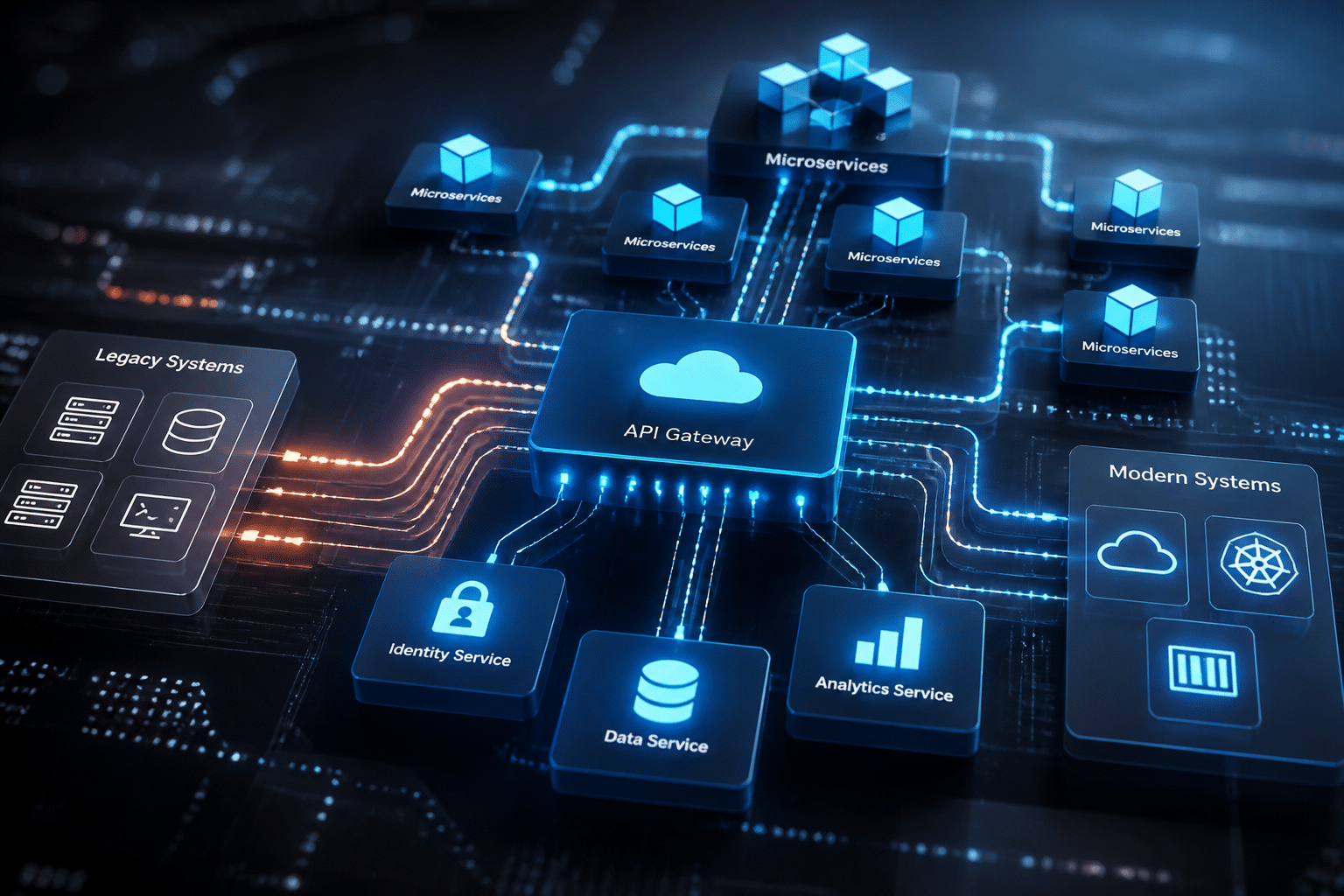
Your audit is done and your apps are sorted. Now comes the fun part: picking how to connect them. There are three main moves, and most teams end up mixing them.
API-Led Connectivity: A Reusable Layer Around the Old Core
This is the go-to approach for most modern software architecture. You leave the legacy system alone and wrap it in APIs. Think of the APIs as a front desk. Everyone talks to the desk, and nobody wanders into the back office.
A common way to build it uses three layers:
System APIs sit directly on the legacy app and expose its data, like customer records or order status.
Process APIs combine those pieces into business steps, like "place an order and check stock."
Experience APIs feed the mobile app, the website or a partner portal.
The payoff is reuse. Build the customer API once, and five teams can use it. Put an API gateway in front so you control who gets in, how often and with what permissions.
Security matters here more than people expect. OWASP's 2025 API security workshop material lists broken authorization and poor endpoint inventory among the leading API risks. So keep a full list of your endpoints, treat the undocumented ones as risky, and use OAuth 2.0 with least-privilege access.
You're not alone in going this way. One market forecast projects API management spending to reach $7.30 billion in 2026 and $9.30 billion in 2027. It's a research-firm estimate, not gospel, but the direction is clear.
The Strangler Fig Pattern: Replace the Monolith Slowly
The name comes from a vine that grows around a tree until the tree is gone. Same idea here. You build new features as small, separate microservices, route some traffic to them, and let the old application shrink over time.
Here's how the two architectures differ at a glance:
Monolith | Microservices | |
|---|---|---|
Structure | One big codebase, deployed as a single unit | Small services, each with one job |
Releases | Whole app ships together | Each service ships on its own |
Failure impact | One bug can take down everything | Problems stay mostly contained |
Scaling | Scale the entire app | Scale only the busy parts |
Team fit | Works for small teams | Works for many teams in parallel |
The steps look like this:
Put a facade or gateway in front of the legacy app.
Pick one small, low-risk function, like address lookup.
Build it as a new service and route a slice of traffic to it.
Compare results, then move all traffic over.
Retire that piece of the old code. Repeat.
Start small. Seriously. A first win builds trust with the business, and you always have a rollback path because the old code is still running. The tricky part is data. Plan how the old database and the new service stay in sync, or you'll end up with two versions of the truth.
ESB or iPaaS: A Central Hub for Messy Connections
When you have dozens of systems talking in different formats, point-to-point links turn into spaghetti. A central hub fixes that. The older kind is an Enterprise Service Bus (ESB), usually run on your own servers. The newer kind is an Integration Platform as a Service (iPaaS), which runs in the cloud and comes with ready-made connectors.
An ESB tends to suit heavily regulated, on-premises setups with strong in-house skills. An iPaaS suits teams who want speed and a mix of cloud and legacy apps. Gartner's 2026 iPaaS Magic Quadrant has several recognized Leaders, and Boomi reports its 12th consecutive Leader placement. Check Gartner's full evaluation before you shortlist anyone, since vendors naturally highlight their own wins.
One reality check: pre-built tools don't remove custom work. Deloitte Digital's 2025 Connectivity Benchmark Report found developers spend about 39% of their time on custom integrations. Odd data formats and proprietary protocols always need a human touch.
Which Approach Fits Your Situation?
Approach | Best for | Pros | Cons |
|---|---|---|---|
API-led layer | Exposing legacy data to new apps fast | Reusable, quick to start, keeps the core stable | Doesn't fix the old code underneath |
Strangler fig with microservices | Replacing a failing monolith over time | Low risk, steady progress, easy rollback | Slower, needs strong data planning |
ESB | Complex on-premises, regulated estates | Central control, mature tooling | Can become a bottleneck, heavier to maintain |
iPaaS | Hybrid cloud and SaaS connections | Fast setup, many connectors | Subscription costs, some vendor lock-in |
Most teams combine them: APIs for access, a hub for the tangled middle, and the strangler pattern for the apps you marked "Migrate." Next, let's look at where custom enterprise software development fits into all this.
The Role of Custom Enterprise Software Development in Your Integration Strategy
Pre-built tools get you a long way. Then you hit the one system that doesn't play by the rules.
That's where custom enterprise software development earns its keep. It isn't about building everything from scratch. It's about building the few pieces that no catalog connector can cover.
When Off-the-Shelf Connectors Hit a Wall
Connectors are great for common stuff, like Salesforce talking to NetSuite. But your 25-year-old order system probably speaks its own dialect. One 2025 review of enterprise integration patterns reported that 49.2% of organizations keep custom-developed integrations alongside platform-based ones. So you're in good company if you need both.
Here's where the ready-made route usually breaks down:
Situation | Why a connector struggles | What custom work adds |
|---|---|---|
Proprietary data formats | No mapping exists for fixed-width files or homegrown message layouts | A translation service that converts to clean JSON or events |
Business rules buried in code | Pricing or eligibility logic can't be configured in a standard tool | Middleware that applies the rules once, in one place |
Strict timing needs | Generic tools add delay or batch things overnight | A lean, purpose-built service tuned for your load |
Odd protocols | Mainframe or SOAP quirks fall outside supported adapters | Custom adapters with proper retries and error handling |
A build-versus-buy white paper frames the choice as a custom architecture versus a ready-made platform. Honestly, the best answer is often a mix of both.
Building a Layer That Lasts
One custom piece deserves special attention: the anti-corruption layer. Picture a translator standing between your shiny new services and the old system. Your new apps use clean, modern models. The translator converts everything into the legacy format and back. So the old system's quirks never leak into your new code.
A good development partner builds this layer with cloud-native habits:
Small, stateless services that run in containers and scale on their own.
Timeouts, circuit breakers and limited retries, so one slow mainframe call doesn't drag down everything.
Logging and tracing from day one, so you can see where a request got stuck.
Automated contract tests that catch breakage before customers do.
That's what "future-proof" really means here. You can swap out the legacy system later, and only the translator changes. Everything above it stays put. Buildera builds this kind of layer for teams that can't afford downtime.
Paying as You Go Instead of Paying Up Front
A full rewrite asks for a huge check before you see anything. A phased plan flips that.
Say you wrap your customer records in a new API first. That alone might let the mobile team ship a self-service feature in a few weeks. Next, you move order status into its own service. Then pricing. Each step delivers something people can use, and each step builds on the last (and yes, each one gives you a number to show the CFO).
Because the old core keeps running, you can pause, adjust or reorder the plan when priorities change. Your wins fund the next phase. And your risk stays small.
So where does this look like in real life? Let's walk through two industries next.
Integration in Action: Real-World Scenarios for Retail and Healthcare
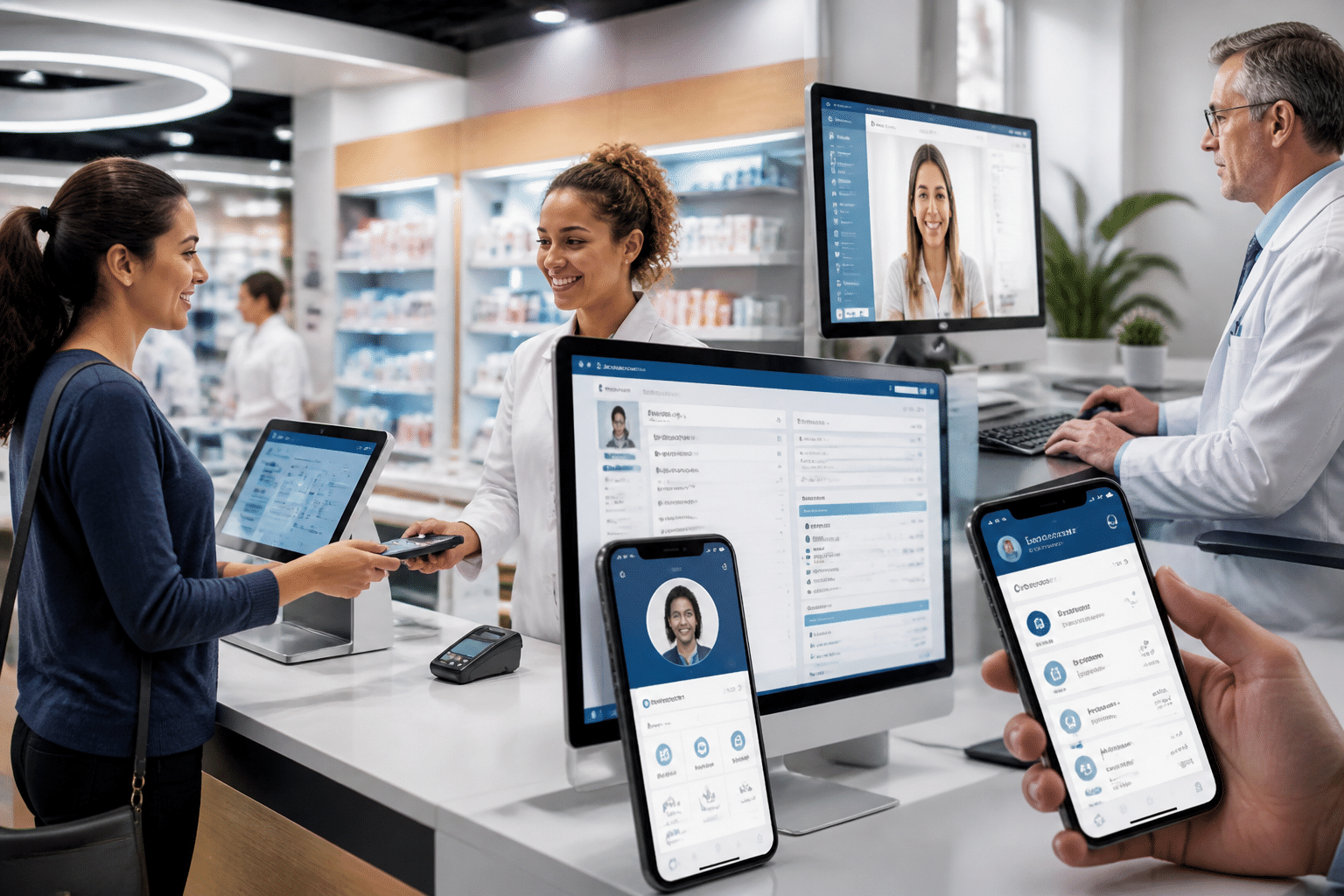
Theory is nice. But what does this look like on a Tuesday morning when a customer wants to know if a jacket is in stock?
Below are two scenarios. They're composites built from common patterns, not named clients. Where I cite real results, they come from vendor-reported case studies, so treat the numbers as directional, not audited.
Retail: Real-Time Stock From a 20-Year-Old Mainframe
Picture a national retailer with 300 stores. Inventory lives on a mainframe that updates in nightly batches. The new e-commerce site and mobile app can't see those updates until the next morning. So shoppers buy items that sold out at 2pm, and store staff apologize on the phone.
The team chose an API-led layer instead of a rewrite. Custom system APIs wrapped the mainframe and exposed stock counts. A process API combined store and warehouse numbers. Experience APIs fed the website and the app. Changes to inventory were also published as events, so the cloud platform saw them in seconds, not hours.
This is where custom enterprise software development did the heavy lifting. No off-the-shelf connector understood the mainframe's fixed-width files. A custom translation service turned them into clean JSON, and an anti-corruption layer kept the old quirks out of the new code.
Before | After | |
|---|---|---|
Stock data | Nightly batch from mainframe | Near real-time through APIs and events |
Web and app | Guess at availability | Show store-level stock |
Mainframe | Touched by many point-to-point jobs | Hidden behind one gateway |
Changes | Risky, slow releases | New channels plug into existing APIs |
What outcomes should you expect? Public numbers are vendor-reported, but they're encouraging. Hexaware describes a retailer with outdated, fragmented backend systems that saw an 85% increase in e-commerce sales after modernizing. And Concord's specialty retail work retired legacy ETL pipelines and unified customer data from more than 10 sources. Neither isolates integration from other investments, so track your own numbers: oversell rates, cancelled orders and click-and-collect volume.
Healthcare: Linking a Legacy EHR Without Breaking HIPAA
Now a hospital network. Its Electronic Health Record (EHR) system is stable and deeply trusted. But the telehealth tool, billing app and patient portal can't talk to it. Staff re-type data, and patients call to ask for results they could see online.
Here the team picked an iPaaS hub with custom connectors. The EHR speaks HL7 v2 messages, while modern apps prefer FHIR APIs. Hospitals often customize HL7 fields, so two "compliant" interfaces can still need separate mappings. That's exactly why prebuilt connectors fell short.
Custom development filled the gap with:
Connectors that translate the EHR's HL7 v2 messages into FHIR resources, and back.
Patient matching logic, so the portal shows the right person's records.
Encryption in transit and at rest, role-based access and full audit logs, which support HIPAA compliance.
Sharing of only the minimum data each app needs.
Resolute Software describes a similar pattern: a decoupled integration engine supporting real-time, two-way exchange, with HL7 v2.x backward compatibility plus FHIR.
Before | After | |
|---|---|---|
Telehealth | Separate records, manual entry | Visits sync to the EHR |
Billing | Delayed, error-prone data | Charges flow from clinical events |
Patient portal | Limited or no live data | Results and appointments visible |
Compliance | Ad hoc exports | Central access control and audit trail |
Patient satisfaction is harder to pin to one project. So measure it directly: portal adoption, call volume to front desks, billing errors and time spent on re-entry.
What Both Stories Share
Neither team replaced its core. Each wrapped it, translated it and moved on one piece at a time. Buildera follows this same pattern with clients in retail and healthcare, because the old system keeps earning while the new layer delivers.
Of course, none of this runs smoothly by default. Next up: the risks that can trip these projects, and how to dodge them.
Managing Risk: Overcoming Common Hurdles in Integration Projects
Here's the honest part. Most integration projects don't stumble because the code is bad. They stumble on security gaps, messy data and people who never got a say.
Let's take those three one at a time.
Locking Down Data in Transit and at Rest
The moment you connect an old system to a new one, you create new paths for data to travel. Each path is a place something can go wrong.
For data in transit, use TLS on every connection. For service-to-service calls, add mutual TLS so both sides prove who they are. At rest, encrypt databases, backups and file drops, even the "temporary" ones (especially those, honestly). Keep secrets like passwords and API keys in a vault, and rotate them on a schedule.
Then handle access. Give each app only the data it needs. Log every request, and keep those logs somewhere tamper-proof. If you work under HIPAA, PCI or GDPR, auditors will ask for exactly that trail.
Moving Data Without Losing Sleep
Data migration is where nerves get tested. The goal is simple: no lost records, and no long outage.
Start by cleaning up. Duplicates and half-filled fields don't fix themselves, they just move to the new system. Then run old and new side by side for a while. Many teams use change data capture to copy updates as they happen, so both systems stay in step.
A few habits help a lot:
Migrate in small batches, not one giant weekend push.
Reconcile counts and totals after every batch.
Rehearse the cutover at least twice.
Keep a tested rollback plan, and set the exit criteria before you start.
Timing matters too. PMI notes that large software projects often run late when errors only show up during testing, when fixes cost the most. So test early and test often.
Bringing Your People Along
This is the part that gets skipped. A TEKsystems survey found only 30% of organizations said change management was a key part of their digital transformation efforts. That's a big gap.
Your legacy experts are not the problem. They're your safety net. They know why that odd batch job runs at 2am. Pair them with modern developers on the same tickets, and let each side teach the other. Plan training for COBOL veterans learning APIs and for cloud engineers learning how the old core behaves.
A simple framework like Prosci's ADKAR (Awareness, Desire, Knowledge, Ability, Reinforcement) keeps the human side on the checklist. Buildera often embeds with in-house teams for this reason, so knowledge stays in the building when the project ends.
Top 10 Integration Project Risks and How to Mitigate Them
# | Risk | How to mitigate it |
|---|---|---|
1 | Hidden dependencies | Audit runtime behavior, not just documents |
2 | Broken authorization | Use a gateway, OAuth 2.0 and least-privilege access |
3 | Unencrypted data paths | Apply TLS and encryption at rest everywhere |
4 | Dirty source data | Set a quality baseline before moving anything |
5 | Data drift between systems | Sync with change data capture and reconcile often |
6 | Long downtime at cutover | Phase the move and run both systems in parallel |
7 | No rollback path | Rehearse reversion and define exit criteria |
8 | Scope creep | Use change control and fund discovery separately |
9 | Key-person dependency | Pair legacy experts with modern developers |
10 | Weak adoption | Train early and keep measuring after go-live |
Cover these ten and you've dodged most of the common traps. Now let's pull it all together.
Conclusion: From Legacy Burden to Strategic Asset
Here's the big idea. Integration isn't a project you finish and file away. It's a habit, a steady journey that turns an old system from a cost you tolerate into a source of data you can actually use.
And the path is simpler than it looks. Three moves cover most of it:
Audit first. Map what you have, sort it with the TIME model and bring the business into the room.
Connect with APIs. Wrap the old core, add a hub where things get tangled and build custom pieces only where connectors fall short.
Modernize in phases. Use the strangler pattern, move one small piece at a time and keep a rollback path.
Looking ahead, the payoff may grow. Gartner analyst Daryl Plummer says products built on composable, API-first, cloud-native architectures will gain a "significant competitive moat" as AI agents shape B2B buying by 2028. It's a forecast, not a guarantee. But the logic holds: modular pieces are easier to swap, extend and feed into AI than one giant block.
So where do you start? Pick one system, run the audit and find your first small win. You don't need to have every answer on day one (nobody does).
If you'd like a partner who's done this before, Buildera can help you shape a roadmap that fits your goals, your team and your risk appetite. Build Your Integration Roadmap Today
Ready to build software that actually works for your business?
Free discovery call · 15 minutes · No obligation