
The Architectural Crossroads: Why Legacy Systems Are Holding Enterprises Back in 2026
Here's a number that should make any CTO wince. An HFS survey of 608 Global 2000 organizations found that about 74% of enterprise IT budgets go to keeping old systems alive. That leaves roughly 26% for anything new.
Think about that for a second.
Most of us have lived it. A simple change takes three months because nobody dares touch the billing module. The market moves fast, and your enterprise application architecture moves like a freight train in fog.
Where the Gap Shows Up
Customers expect speed, smooth mobile experiences and instant answers. Systems built ten or fifteen years ago weren't made for that. And the cost isn't just money. It's slower releases, patchwork fixes, security holes nobody has time to close, and teams stuck on maintenance instead of building.
AI makes it worse. A 2026 GFT report says 84% of surveyed organizations cancelled an AI pilot or project because of legacy limits. The ideas were fine. The foundation wasn't.
Then (monolithic thinking) | Now (modern enterprise architecture) | |
|---|---|---|
Release speed | Big releases, a few times a year | Small, safe changes, often |
Scale | Buy bigger servers | Scale only the parts that need it |
Failure | One bug can take everything down | Problems stay contained |
Data | Locked in silos | Ready for analytics and AI |
What This Guide Covers
I won't pretend there's one perfect blueprint. There isn't. But there are solid best practices for enterprise software development that help you pick better, avoid expensive mistakes, and build systems that grow with the business.
Let's start with the foundations.
Foundational Principles of Modern Enterprise Application Architecture

Before you pick a pattern or a cloud vendor, you need ground rules. Think of them as the house rules every design decision has to pass. Get these right and the rest gets easier.
Scalability and Elasticity
There are two ways to handle more load. Vertical scaling means buying a bigger server. Horizontal scaling means adding more machines and sharing the work.
Vertical is simple, but it hits a ceiling fast. And when that one big box fails, everything fails with it. Horizontal takes more planning, yet it's what modern enterprise architecture leans on.
Elasticity goes one step further. The system grows when traffic jumps and shrinks when it drops, so you're not paying for idle servers at 3am. Picture a retailer on Black Friday, or a hospital portal during flu season when telehealth visits spike overnight. Those loads aren't steady. Your design shouldn't be either.
Modularity and Decoupling
Here's the idea: break the system into smaller, independent pieces. Each one does a single job and talks to the others through clear contracts.
Why bother? Uber's engineers described how their growing monolith shipped the entire codebase together, which made separating concerns hard. Moving to services let teams change one part without touching the rest. Releases get faster, and maintenance stops feeling like defusing a bomb.
One warning, though. Slice things too thin and you end up with a distributed monolith, where services still have to deploy together. Split along real differences in scaling needs, ownership or how often things change.
Security by Design
The old approach was a castle wall. Build a strong perimeter, then trust everything inside. That fails once you have APIs, SaaS tools and remote teams.
Security by design flips it. You build protection into every layer from day one. OWASP's 2025 guidance on insecure design stresses threat modeling and security controls during planning, not after launch. In practice, that means giving each service only the access it needs and checking trust at every boundary.
Bolting security on later is like adding seatbelts after the car's built. Possible. Painful. Rarely as good.
The Core Principles at a Glance
Principle | What it means | Business benefit |
|---|---|---|
Scalability | Add capacity by adding machines, not bigger ones | Handle peak demand without outages |
Elasticity | Capacity grows and shrinks automatically | Pay only for what you use |
Maintainability | Small, independent modules | Faster fixes and safer releases |
Security | Controls built into every layer | Lower breach risk and audit stress |
Resilience | Failures stay contained | Less downtime and lost revenue |
Extensibility | New features plug in easily | Quicker launches and AI readiness |
These principles work together, and next we'll look at the patterns that put them to work.
Choosing the Right Fit: Key Scalable Software Architecture Patterns
There's no winner here. Anyone who tells you "microservices always" or "monoliths never" is selling something. The right pattern depends on your team, your traffic and how fast your business changes.
So let's walk through three scalable software architecture patterns that come up in almost every enterprise system design conversation.
Microservices: Power With a Price Tag
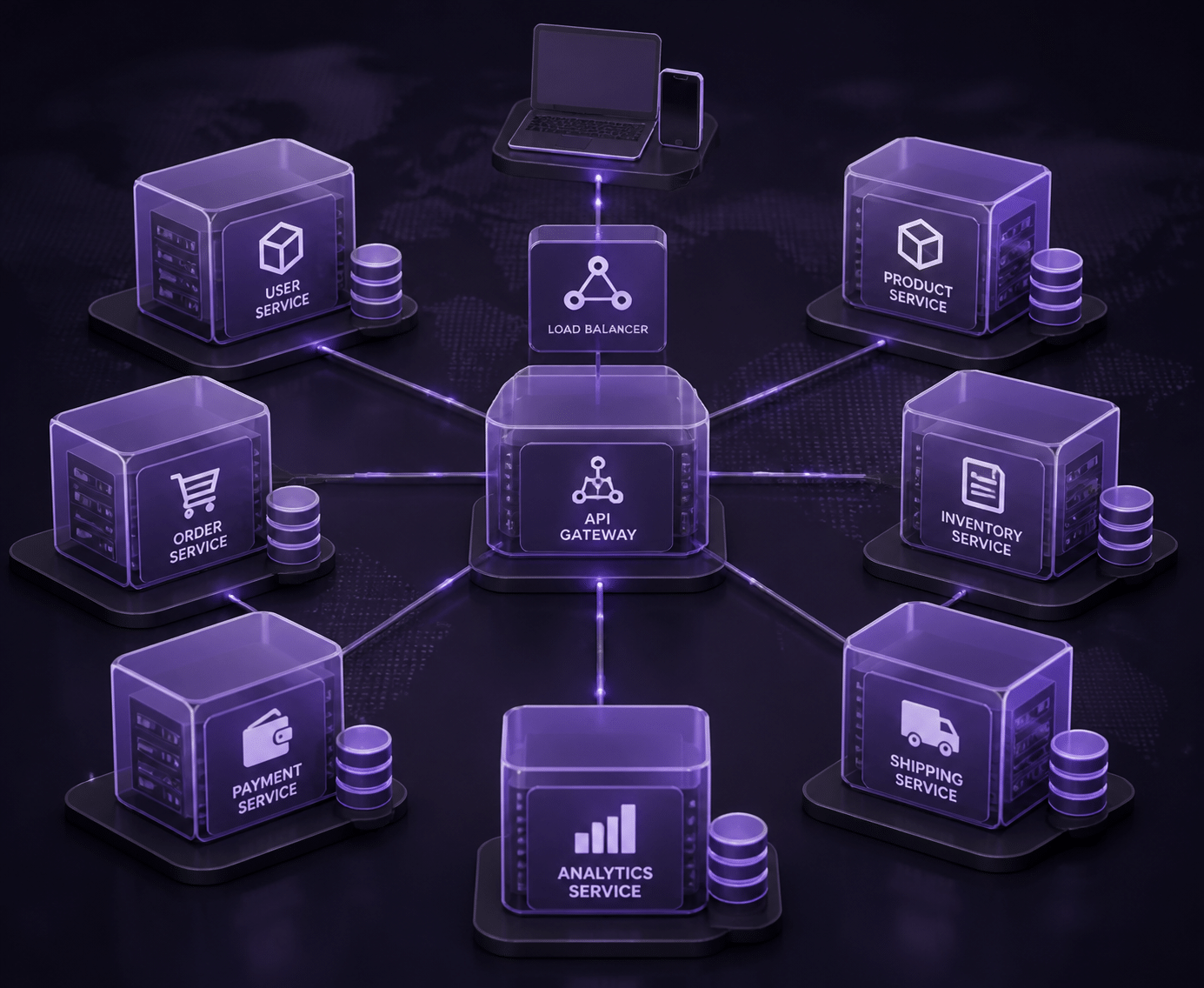
Microservices split one big application into many small services. Each one owns a single job, runs on its own and can be deployed without asking permission from the rest.
The upsides are real. Teams ship on their own schedule. One service can use Python while another uses Java or Go, so you pick the right tool for each job. And you scale only the parts that are busy, which saves money.
But here's the catch. You've traded one big problem for lots of small ones. Now you're dealing with network calls, version mismatches, distributed tracing and a pile of moving parts. Uber's team, for one, later described how hundreds of services created real complexity, and they responded with domain-oriented design and fewer, better-organized services instead of endlessly adding more.
That's why most teams that succeed build a platform layer first. Think Kubernetes, standard deployment templates, a message backbone and good monitoring. Skip that step, and the service count outruns your ability to manage it.
Event-Driven Architecture: Built for Right Now
In an event-driven setup, services don't call each other and wait. Instead, something happens (an order is placed, a sensor fires, a payment clears) and that event gets published. Other services pick it up and react whenever they're ready.
This is asynchronous processing, and it's a big deal for responsiveness. AWS guidance puts it simply: building asynchronous, event-driven architectures lets you decouple components and scale them independently. OK, technically that page is a Google Cloud service comparison, so treat the idea as a widely shared principle rather than a one-company quote.
Where does it shine?
Finance: payments, fraud checks and transaction processing that need answers in milliseconds
Logistics: order status, inventory and fulfillment updates as packages move
IoT and manufacturing: equipment readings and predictive maintenance alerts streaming in all day
How common is it? A 2025 architecture survey found 55% of respondents using event-driven architecture, compared with 60% for microservices. So it's mainstream, and plenty of teams mix both.
The tradeoff? Debugging gets trickier. When ten things react to one event, tracing a bug feels like following a rumor through an office.
Don't Write Off the Monolith (Or Its Modular Cousin)
A monolith is one codebase, deployed as one unit. It gets a bad reputation, and sometimes that's fair. But for an MVP, a small product or a team of eight, it's often the smartest choice. Fewer moving parts. Faster early development. Simple testing.
The classic problems show up as you grow: slow releases, tangled code and one bug that can drag down everything.
A modular monolith softens that. You keep one deployment, but inside, the code is split into clean modules with strict boundaries and no sneaky shortcuts into each other's data. Later, if one module needs its own scaling, you can pull it out as a service. It's a nice middle road, and honestly, I think it's underrated.
Here's a worthwhile reminder. A lot of famous scaling failures weren't caused by the monolith label. They came from tight coupling, weak isolation and poor deployment practices. You can build a messy microservices system just as easily.
Side-by-Side Comparison
Criteria | Monolith (modular) | Microservices | Event-driven (EDA) |
|---|---|---|---|
Development speed | Fast at the start, slows as code grows | Slower start, faster for many teams later | Moderate, needs event design upfront |
Scalability | Scale the whole app together | Scale each service on its own | Scale producers and consumers separately |
Operational complexity | Low | High | Medium to high |
Fault isolation | Weak, one failure can spread | Strong when boundaries are real | Strong, queues absorb shocks |
Ideal use case | MVPs, small apps, focused teams | Large, complex apps with many teams | Real-time workflows, streaming, IoT |
Most mature enterprises don't pick just one. They run a modular core, microservices for fast-changing areas and events to tie it all together.
Not sure which mix fits? That's where IT consulting for enterprise teams earns its keep, and it's the kind of design work Buildera does with clients every week. Next, we'll look at how the cloud changes these choices.
Leveraging the Cloud: Cloud-Native and Headless Architecture Strategies
Patterns are only half the story. Where and how you run them matters just as much. And this is where plenty of teams trip.
Cloud-Native Is More Than Lift-and-Shift
Here's a mistake I see all the time. A company picks up its old application, drops it onto cloud servers and calls it "migrated." That's lift-and-shift. It's fast, sure. But you're basically paying cloud prices for the same old problems.
Cloud-native cloud solutions are built differently. The app is designed from the start to use what the cloud does well:
Containers package each service so it runs the same everywhere, and tools like Kubernetes handle scheduling and scaling.
Serverless functions run code only when something triggers it. AWS Lambda, Azure Functions and Google Cloud Run all work this way.
Managed databases mean someone else handles patching, backups and failover.
Google describes its serverless portfolio as a mix of Cloud Run, Eventarc, Pub/Sub, Cloud SQL, Firestore and more. Translation: you stitch together managed pieces instead of babysitting servers.
The market agrees this is where things are heading. Mordor Intelligence puts the serverless market at about $32.59 billion in 2026, growing to $91.56 billion by 2031. Other research firms give different numbers (they define "serverless" differently), but the direction is the same.
One caution. Cloud isn't the strategy. For each workload, decide whether to rehost, replatform, rebuild or retire it. Not everything deserves a rewrite.
Headless: One Backend, Many Faces
Now for the front end. In a traditional setup, the website and the business logic are glued together. Want a mobile app? You often rebuild half the thing.
Headless architecture cuts that glue. The back end (content, products, carts, orders) lives behind APIs. The front end, or "head," is just a client that asks for what it needs. Headless CMS and headless commerce are the two most common versions.
Front-end "head" | What it does | How it connects |
|---|---|---|
Web app (React, Next.js) | Customer storefront or portal | REST or GraphQL APIs |
Mobile apps (iOS, Android) | Native shopping and account features | Same APIs |
In-store kiosk | Self-service ordering and lookups | Same APIs |
Digital signage | Live promos and pricing | Same content layer |
Future channels (voice, wearables) | Whatever comes next | Add a new head, keep the back end |
One Drupal headless case study describes a retailer running a React site, iOS and Android apps, kiosks and digital signage from a single platform. It reported a 70% cut in cross-channel campaign launch time and a 35% better Net Promoter Score. The retailer isn't named and it's a vendor write-up, so treat those numbers as a good example, not a guarantee.
What It Means for Your Team
So why should a CTO care? A few reasons stand out.
Less infrastructure babysitting. Managed services take over patching, scaling and failover, so engineers work on features.
Faster time-to-market. Front-end and back-end teams move at their own speed instead of waiting on each other.
Room to adapt. When a new channel or device shows up, you build a new head. No full re-architecture.
There's a flip side, and I won't skip it. Headless means more pieces to coordinate, and cloud bills can surprise you without cost tracking. A good plan and a team that's done it before help a lot, which is where IT consulting for enterprise projects, like the work Buildera does, can save months.
Next, we'll look at how AI and data platforms fit onto this cloud foundation.
Architecting for Intelligence: Integrating AI and Data Platforms

AI is no longer a side project. In McKinsey's 2026 global survey, 44% of respondents said AI was scaling across their enterprise, up from 38% the year before. But here's the thing. Most AI trouble isn't about the model. It's about everything around it.
Build the Plumbing Before the Brain
A model is only as good as the data it eats. So the first job is a solid data pipeline: collect data from your apps, clean it, and deliver it where models can use it.
For fast-moving data, teams usually pick between two designs. Lambda runs a batch layer and a speed layer side by side. Kappa pushes everything through one event stream and replays it when needed. One 2026 pipeline guide suggests Kappa or unified stream and batch designs suit most new real-time work. Lambda still fits when heavy historical processing has to sit next to low-latency results.
Then comes deployment. The simplest move is treating each model like any other microservice. Wrap it in an API, put it in a container, and let other services call it. You can update the model without touching the apps that use it.
And don't skip feedback loops. Predictions need to flow back, so you can spot drift when the real world stops matching your training data. A model nobody checks goes stale quietly.
Stage | What happens | Typical building blocks |
|---|---|---|
Ingestion | Events and records arrive from apps, sensors and partners | Kafka, cloud event buses, APIs |
Processing | Data is cleaned, joined and checked for quality | Spark, Flink, managed pipelines |
Storage | Raw and prepared data is kept for reuse | Data lake, warehouse |
Training | Models learn from prepared data | ML platforms, GPU jobs |
Inference | The model serves answers through an API | Containers, serverless endpoints |
Feedback | Results and errors return to improve the model | Monitoring, retraining jobs |
Lakes, Warehouses and the Data Mesh Question
A data lake stores raw data cheaply, in any format. A data warehouse holds cleaned, structured data that's ready for reports. Most enterprises end up with both. Think of the lake as the garage and the warehouse as the showroom.
Then there's data mesh. Instead of one central team owning everything, each business domain owns its data and shares it as a product. Billing owns billing data. Supply chain owns its own.
Sounds great, and sometimes it is. But TechTarget's look at the costs points out that return depends heavily on where you're starting, and smaller or simpler setups may not get their money's worth. Atlan's analysis adds a warning for AI: spread-out ownership can create competing definitions and patchy lineage.
My take? Start with two or three high-value domains. Publish clear data contracts. Give everyone a shared self-service platform. Grow from there.
What This Looks Like on the Ground
Retail: A retailer streams orders, returns and web clicks into one pipeline. A demand model runs as a service, and store managers see restock suggestions before shelves go empty.
Healthcare: Imaging and lab data land in a governed store. A diagnostic model flags scans for a radiologist to review first. Doctors' corrections feed back as new training data.
Real estate: Sensors in a smart building send temperature, occupancy and energy readings. A model tunes heating and cooling, and flags equipment likely to fail before tenants notice.
These are the kinds of builds Buildera's teams scope with clients, usually starting with the data foundation, not the model.
Of course, more data and more AI also means more to protect. That's where we're heading next.
Architecting for Resilience: A Deep Dive into Security and Governance

Knight Capital lost about $440 million in 45 minutes. The cause wasn't a hacker. It was a messy deployment that woke up old code nobody had cleaned out. That's the point of this section: strong architecture means little if security, failure planning and oversight are afterthoughts.
DevSecOps: Security Inside the Pipeline
DevSecOps just means security checks run where the code already moves. Not in a review three weeks later.
Why does it matter? Google Cloud's threat report for the second half of 2025 says weak or missing credentials caused 47.1% of observed cloud incidents. Those are boring, preventable problems, and a pipeline can catch many of them.
Here's what to wire into your CI/CD flow:
Design stage: a quick threat model and data-flow diagram for any new service
Every pull request: code scanning, dependency checks and secrets detection
Infrastructure changes: policy-as-code that blocks open storage or overly broad permissions
Before release: signed build artifacts and a software bill of materials
Compliance: automated evidence collection, so audits don't mean a month of screenshots
Start small. One blocking check that people trust beats ten noisy ones they ignore.
Designing for Failure: Resilience and High Availability
Systems fail. Plan on it.
New Relic's 2025 research found a median cost of $2 million per hour for high-impact outages. Teams with full-stack observability averaged half that. So seeing problems early pays for itself.
Redundancy is the starting point: spread workloads across zones (or regions for critical systems), replicate data and remove any single point of failure. Then add failover that works without a human at 2am. Health checks, circuit breakers, retries with backoff and queues that absorb spikes all keep one sick service from taking down its neighbors.
Set recovery targets too. RTO is how fast you must be back. RPO is how much data you can afford to lose. Write them down per business service.
Then test them. GitLab's 2017 database incident showed what untested backups can do. Chaos engineering is the proactive fix: break things on purpose, in small and controlled ways, during working hours. Kill a node. Slow a dependency. Watch what happens. It feels odd at first, but it beats learning the hard way.
Governance That Doesn't Slow Everyone Down
Good architecture drifts without someone watching. Quick fixes pile up, exceptions become habits, and technical debt grows quietly. Kyndryl's 2026 research found only 9% of organizations had fully mapped their business-critical applications and dependencies. You can't govern what you can't see.
An Architecture Review Board (ARB) helps, if it's small and cross-functional. Think architecture, security, platform, SRE and product. Keep these habits:
Review by risk. Only big changes get a full look.
Publish guardrails and reference architectures so standard work needs no meeting.
Record decisions in one-page Architecture Decision Records.
Give every exception an owner and an expiry date.
A simple change flow looks like this:
Propose: the team submits a short design and decision record.
Triage: low-risk changes follow approved patterns. High-risk ones go to the board.
Review: security, resilience and cost get checked against the guardrails.
Decide: approve, adjust or decline, with reasons written down.
Revisit: check again after incidents or big shifts in traffic.
10 Questions for an Architectural Security Review
# | Question | Why it matters |
|---|---|---|
1 | Where are the trust boundaries? | Shows where checks must happen |
2 | Was a threat model done? | Finds risks before code exists |
3 | Does each service get least privilege? | Limits the damage from one breach |
4 | How are secrets stored and rotated? | Stops leaked keys |
5 | Is every API authenticated and authorized? | Blocks unauthorized access |
6 | What sensitive data moves, and is it encrypted? | Protects privacy and compliance |
7 | Are third-party dependencies tracked? | Reduces supply chain risk |
8 | What's the single point of failure? | Exposes outage risk |
9 | What are the RTO and RPO, and were they tested? | Proves recovery works |
10 | Who gets alerted, and how fast? | Shortens detection time |
Buildera often runs reviews like this with enterprise teams before a big migration, because fixing a design on paper is much cheaper than fixing it in production.
With security, resilience and governance in place, the last step is turning all of this into real business results.
From Blueprint to Business Value: Activating Your Modern Architecture Strategy
We've covered a lot of ground. So let's pull it together.
The shift from rigid monoliths to flexible, decoupled and smarter systems isn't a nice-to-have anymore. If your competitors can ship weekly and you ship quarterly, that gap grows every year. Good enterprise software development isn't about chasing trends. It's about making your business faster, steadier and easier to change.
The 5 Best Practices to Remember
Build on solid principles. Scalability, modularity and security by design come before any pattern or vendor.
Match the pattern to the problem. Modular monolith, microservices and events all have a place. Split along real differences, not for fashion.
Go cloud-native on purpose. Don't just lift-and-shift. Decide workload by workload, and use headless where many channels share one back end.
Lay the data plumbing first. AI works when pipelines, ownership and feedback loops are in place.
Treat resilience and governance as design work. Threat models, tested recovery targets and a light review board keep things from drifting.
Why It Pays Off
A solid architecture connects straight to results you can measure. Teams get more done because they're not fighting the system. New ideas reach customers sooner. Apps stay up, so people keep coming back.
I'll be honest, though. Modernization isn't guaranteed to pay off. Kyndryl's 2026 research found that 18% of organizations said their efforts delivered limited or unclear value. The gap usually comes down to goals. Tie every step to an outcome, like release frequency, fewer incidents or cost per transaction, and you'll know whether it's working.
Your First Move: Audit What You Have
Don't start with a big rewrite. Start with a map.
List your applications, how they connect, where the data lives and which ones hurt the most. Rank them by business value and risk. Then pick one small, useful slice to modernize first, and keep a way to roll back.
This part can feel heavy, and plenty of teams stall on it. A good IT consulting partner can speed things up by spotting hidden dependencies, sizing the effort honestly and helping you avoid expensive detours. That's the kind of work Buildera does with enterprise teams.
Ready to see where your systems stand? Talk with the Buildera team about a practical first audit, and turn this blueprint into something you can actually build.