Introduction: Moving Beyond Disjointed Systems to Strategic Growth
Here's a number that should make any CTO wince. MuleSoft's 2025 Connectivity Benchmark Report found that 83% of organizations call integration challenges a big barrier to legacy modernization. And only 10% said they had no data silo problems at all.
So if your finance team lives in one tool, your warehouse in another, and sales in a third, you're not alone. You're pretty much the norm.
The Real Cost of Disconnected Systems

You know that sinking feeling when two reports show two different revenue numbers? I've seen teams burn a whole Monday just figuring out which spreadsheet to trust. Multiply that by every department, every week.
The pain shows up in familiar ways:
Orders get keyed in twice, and one copy goes wrong
Inventory counts don't match what sales promised
Month-end close drags on because nobody trusts the numbers
Every new location or product line means another patch
That's not just annoying. It's a ceiling on growth. Grant Thornton found that 93% of business leaders were raising tech spending, but only 27% said their technology was fully lined up with business goals. Lots of money, not much alignment.
ERP Software as the Business's Nervous System
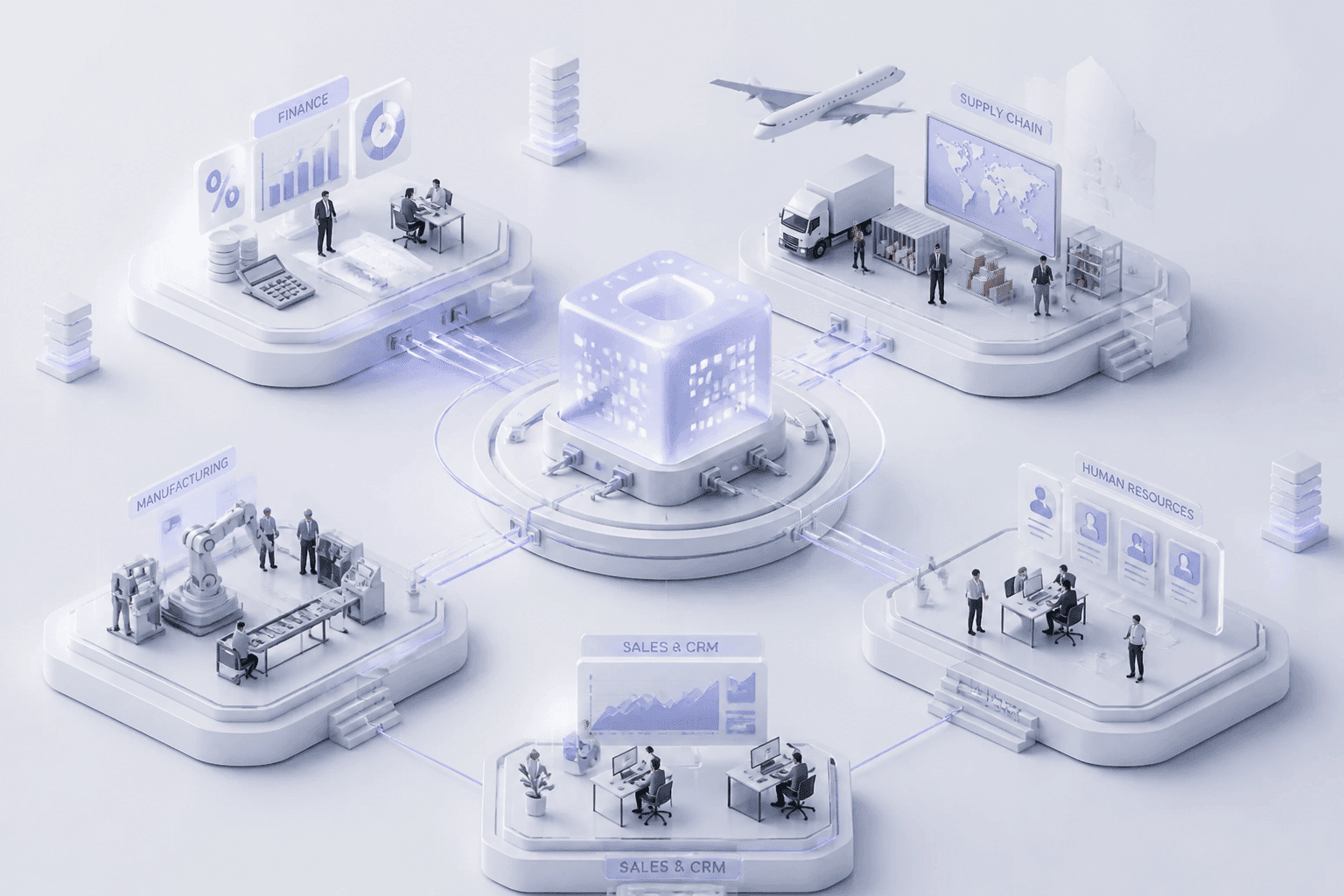
This is where modern erp software changes the picture. Think of it less like an operations tool and more like a central nervous system. Sales, finance, inventory, production and customer data all feed one connected brain. When something happens in one corner, the rest of the business feels it right away.
That's what lets leaders make decisions from live data instead of last week's export. And the market clearly sees it. Grand View Research puts the global market at USD 77.08 billion in 2025, growing at a 9.5% CAGR through 2033.
What We'll Focus On
Here's the thing though. A giant list of enterprise resource planning features won't help you much. Every vendor has one. What matters is which features actually create business value and a real edge in 2026.
So that's the plan. We'll start by getting clear on what ERP really means today, then work toward the features worth your budget.
What is ERP Software? A Strategic Definition for 2026
Let's start with a plain answer. ERP stands for enterprise resource planning. It's one system that ties your core business processes together: finance, HR, supply chain, sales, procurement and production. One platform. One shared set of records.
That's it. Everything else is detail.
How the Pieces Connect
Picture a hub with spokes. Each department plugs into the same center instead of keeping its own private copy of the truth.
Department | What it feeds into the ERP | What it gets back |
|---|---|---|
Finance | Ledger entries, invoices, payments | Live orders, costs and cash position |
HR | Headcount, payroll, time data | Project and department cost data |
Supply chain | Stock levels, purchase orders, shipments | Sales demand and production plans |
Sales | Orders, prices, customer details | Real stock and delivery dates |
So when sales books 500 units of a product, inventory reserves the stock right away. Purchasing sees any shortfall in materials. The ledger records the financial impact, and the warehouse sees the same delivery date. Nobody retypes anything.
A quick caveat (and this took me a while to appreciate). A "single source of truth" doesn't always mean one giant physical database. It means each type of data, like customers, products or inventory, has one clear owner, and everyone works from that synced record. Not five conflicting spreadsheets.
From Server Rooms to the Cloud
Older ERP lived on your own servers. You bought licenses, hired people to patch it, and braced for every upgrade. It worked, but it was heavy.
Cloud erp software flipped that model. Most of the hosting and maintenance moves to the vendor, and your team logs in from anywhere. Here's what changes:
Accessibility: Finance, field staff and warehouse teams use the same system from any approved device.
Scalability: Adding users, entities or locations is a settings change, not a hardware purchase.
Lower maintenance: Updates arrive on a schedule, so your IT team spends less time keeping the lights on.
The shift is already happening. Panorama Consulting's 2025 ERP Report isn't the only source here, but other tracking puts cloud at roughly two-thirds to four-fifths of new ERP projects, depending on how you count. On-premise is now the minority.
Why a CTO Should Care
The real prize isn't the software. It's trust in your numbers. When every team sees the same live data, leaders can decide faster, and the silos between departments start to shrink.
People usually buy ERP for three reasons. They want to replace aging systems, pull scattered applications together, or get modern automation and room to grow. Gartner points to standardized processes, better efficiency and lower IT costs as the main benefits.
So that's the foundation. Next, let's look at which core features actually deliver on it.
The Foundational Pillars: Core ERP Features Every Business Needs
OK, so you've got the big picture. Now for the parts you'll actually touch. Almost every ERP system is built from the same four building blocks, and if one is weak, the whole thing wobbles. These are the key features of ERP that most mid-sized companies need on day one.
Finance and People: Money and Talent
Finance is usually where ERP starts. It's the module everyone leans on.
The core pieces are the general ledger, accounts payable, accounts receivable and financial reporting. Good ones also handle compliance, so your books follow GAAP or IFRS without a pile of manual workarounds. The real prize is live visibility. When an invoice posts, your cash position changes right then, not at month-end.
That speed shows up in the close. Intuit reports that Cornerstone Development Company and Rhodes Companies each cut month-end close time by 50%. Results will vary, of course, but fewer spreadsheets almost always means a shorter close.
Then there's human capital management (HCM). It covers payroll, benefits administration, talent management and workforce analytics. Sounds like back-office stuff, right? Not really. Hiring and keeping skilled people is one of the hardest jobs right now, and analytics help you spot turnover patterns, skill gaps and overloaded teams before someone resigns. Plus, because HR sits in the same system as finance, labor costs land in the right project or department automatically.
Supply Chain and Customers: Where Operations Meet Revenue
Supply chain management (SCM) is the module that keeps promises. It pulls together inventory control, order management, procurement and logistics. You see what's on the shelf, what's on order and what's headed out the door.
When it works, you carry less stock and ship on time. Priority Software says BioThane cut inventory costs by 40% after using its MRP capabilities. That's one vendor's case, so treat it as a sign of what's possible, not a guarantee. Still, happier customers usually follow when orders arrive when you said they would.
Customer relationship management (CRM) is the fourth pillar. It brings sales, marketing and customer service data into one 360-degree view of each customer. The magic happens when CRM meets ERP data. OWOX explains that linking customer behavior with real orders, margins, returns and payments lets you measure lifetime value on actual profit, not pipeline guesses. Nobody can promise a fixed percentage uplift here. But you'll know who your best customers really are.
The Four ERP Modules at a Glance

Module | Key functions | Main business benefit |
|---|---|---|
Financial management | General ledger, AP/AR, reporting, GAAP and IFRS compliance | Live financial visibility and a faster close |
Human capital management | Payroll, benefits, talent management, workforce analytics | Better hiring and retention decisions |
Supply chain management | Inventory control, order management, procurement, logistics | Leaner stock and more reliable deliveries |
Customer relationship management | Sales, marketing and service data in one view | Stronger engagement and smarter upselling |
If you're not sure which of these ERP modules to prioritize, a partner like Buildera can help map them to your real workflows. Once these four are solid, you can start looking at the features that push you ahead of competitors.
Gaining a Competitive Edge: Advanced ERP Features for Scalability and Innovation
Core modules keep the business running. They don't make it faster than the competition. That's where the next layer comes in, and three features matter most: analytics, AI and mobile cloud access.
Business Intelligence That Turns Data Into Decisions
Raw data is just noise until someone can read it. Modern ERP systems come with built-in business intelligence (BI): dashboards you can customize by role, real-time reporting, and predictive analytics that look forward instead of back. Your CFO sees cash flow. Your operations lead sees late shipments. Same data, different view.
Does it pay off? A 2025 roundup of BI research reports that ERP systems with advanced analytics average a 112% ROI over five years, with payback in about 1.6 years. I'd treat that as a benchmark, not a promise. Clean data and real user adoption decide whether you get anywhere near it.
Here's a simple test. Ask any vendor to build a live dashboard from your own sample data during the demo. Slides are easy. Your messy data is the real exam.
AI and Machine Learning Inside Your ERP

This is the part CTOs ask about most. And it's more down to earth than the hype suggests. Here's where AI shows up in day-to-day ERP work:
Demand forecasting: Models learn from past sales and seasonal swings, then suggest stock levels before you run short.
Process automation (RPA): Software bots handle repetitive work like invoice matching, data entry and approval routing.
Predictive maintenance: Equipment and service history can flag a machine that's likely to fail, so you fix it on your schedule, not its own.
AI use case: catching bad payments early. In Microsoft Dynamics 365 Finance and Operations, AI-powered anomaly detection can flag odd purchase orders, unusual prices and changed supplier bank details before money leaves the building. One of those changed bank accounts could be a fraud attempt. Catching it takes seconds.
AI can also move past reporting and make operational calls. Ecosire's 2026 trends piece describes route optimization that blends delivery history with live traffic, weather, vehicle availability and delivery windows.
One honest caveat. AI is only as good as the data feeding it. If your product and customer records are a mess, the forecasts will be too.
Mobile Access and Cloud-Native Platforms
Your people aren't all at desks anymore. A warehouse lead scans stock on a phone. A field tech closes a work order from a customer's parking lot. A manager approves a purchase order from an airport gate (we've all done it). Mobile ERP apps make that normal.
Cloud-native platforms add the other half. You scale by changing settings, not buying servers. Updates roll out on a schedule instead of becoming a yearly project. Plus, new locations come online faster.
But more access means more risk, so security can't be an afterthought. TechTarget points to asset visibility, risk assessment, regular testing, user education and incident response as core practices. In plain terms, a CTO should push for:
Multi-factor login and role-based access, so people only see what they need
Mobile device management, with remote wipe for lost phones
Encryption for data in transit and at rest, including exports and backups
Locked-down APIs for every connected app and partner tool
A team like Buildera can help with cloud migration and AI integration if your in-house bandwidth is thin. Once these advanced features are in place, the next question is how much to bend the system around your own workflows.
Customization vs. Configuration: Tailoring ERP Features to Your Unique Workflows
Here's a mistake I've watched happen more than once. A team falls in love with one odd workflow, asks for it to be coded into the system, and three years later nobody can upgrade. Ouch.
So before you say yes to any "can you just make it do this?" request, get clear on two words that sound alike but cost very different amounts.
Configuration vs. Customization in Plain Terms
Configuration means using the tools already built into your erp software. You set up approval workflows, add fields, change permissions, build reports, and adjust business rules. No new code. The vendor still supports it, and upgrades usually don't break it.
Customization means writing new code to add a feature the system doesn't have. It's powerful. It's also heavier.
The cost gap is real. Clarity Ventures is one of several sources that point the same way: configuration is usually faster, cheaper and easier to upgrade. Recent estimates put a configuration-led mid-market rollout at about 6 to 9 months, while heavy customization can stretch to 18 to 24 months. Those are market estimates, not promises. Still, the direction is clear.
Approach | What you do | Typical impact |
|---|---|---|
Configuration | Use built-in settings, workflows and reports | Lower effort, easier upgrades, often 6 to 9 months for a mid-market rollout |
Targeted customization | Add custom code for one specific need | Extra design, testing and support, often 10 to 30% more cost |
Heavy core customization | Rewrite how the core system behaves | Often 18 to 24 months, painful upgrades |
When Customizing Is Actually Worth It
Here's my rule of thumb. Customize only when the process is a real competitive edge that no off-the-shelf option can support. Think of a distributor whose contract pricing mixes volume tiers, freight, rebates and currency. If that pricing is how you win deals, it's worth building.
Walk through these questions in order, like a quick decision tree:
Can a built-in setting, workflow or report do the job? If yes, configure it. Stop here.
Is the process truly different from how competitors work, and does it help you win customers? If no, change the process instead.
Is it a legal or critical operational need the system can't meet? If yes, customize, but keep it small.
Can it live outside the ERP core, through an API or extension? If yes, build it there.
Does it have an owner, a measurable outcome and a five-year cost estimate? If not, pause.
Why so strict? Because over-customizing has a price. SAP describes extensive customizations and poorly documented integrations as sources of technical debt that slow modernization and make maintenance harder. And CIO reported that IDC research linked technical debt to 49 to 60% higher maintenance costs at large enterprises. Custom code can also block the AI features discussed earlier, since messy structures make clean data harder to get.
APIs and Low-Code: A Lighter Way to Extend
OK, here's the good news. You often don't have to choose between "stock" and "heavily modified." There's a middle path.
Modern ERP platforms expose APIs, so you can connect a custom pricing tool, a customer portal or a partner system without touching the core. Low-code and no-code platforms go further. Business teams can build forms, approval flows and simple apps on top of the ERP, and developers focus on the harder pieces. The core stays clean, so vendor updates keep landing without drama.
That's the approach a partner like Buildera tends to favor: keep the ERP core standard, then build the differentiating layer around it with APIs and extensions. You get the unique feature without the upgrade headaches.
Once you know what to configure and what to extend, there's another question. Does your industry need features a general-purpose system simply doesn't offer?
Industry-Specific Features: Why a One-Size-Fits-All ERP Fails
A retailer, a hospital group and a property developer can all buy the same erp software. They won't use it the same way. Not even close.
Generic modules handle the basics fine. Ledgers are ledgers. But the stuff that actually decides whether your business wins or limps along? That's usually industry-specific. So let's look at three sectors where the gaps show up fast.
Retail and E-commerce: One Stock Pile, Many Doors

Retail lives or dies on inventory. A shopper clicks "buy" online, walks into a store, or picks something up at the curb. It's the same shelf either way, and your system has to know that.
Three features matter most here:
Omnichannel inventory management: One live stock count across stores, warehouses and web shops.
POS integration: Register sales hit inventory and finance right away, not overnight.
Promotion management: Discounts, bundles and loyalty offers get set once and apply everywhere.
Picture a 40-store apparel chain (a made-up example, but a common one). Online orders ship from whichever store has the item, instead of from one distant warehouse. Fewer stockouts, less dead stock. Without those features, you're back to spreadsheets and guesswork.
Healthcare: Where Privacy Rules Shape the System
Healthcare ERP has a harder job. It connects billing, purchasing and supplies while guarding patient information.
Look for HIPAA-ready controls like role-based access, audit trails and encryption. Add electronic health record (EHR) integration, so clinical and financial data talk to each other. Then there's patient lifecycle management, which follows a person from scheduling to billing to follow-up.
Here's a concrete case. Pharmaceutical teams often need FDA 21 CFR Part 11 support, meaning secure logins, tamper-evident audit trails and electronic signatures. But (and this trips people up) having the features doesn't make you compliant. The system still needs proper setup, validation and vendor contracts, like a business associate agreement for cloud hosting.
Real Estate: Many Properties, Many Entities
A property group might juggle hundreds of leases, dozens of legal entities and very different asset types. Generic accounting just can't keep up.
Real estate teams usually need:
Property and lease administration, with rent schedules and critical-date alerts
Project cost tracking for development work
CAM (Common Area Maintenance) reconciliation, so shared costs get billed to tenants correctly
Belgium-based Weerts Group is a good example. According to its client story, FlexProperty on Microsoft Dynamics 365 pulled scattered financial and operational data together across more than 100 entities. Reporting, lease tracking, asset management and compliance monitoring all moved into one place.
Industry Features at a Glance
Industry | Must-have features | Problem it solves |
|---|---|---|
Retail and e-commerce | Omnichannel inventory, POS integration, promotion management | Stockouts, overstock and mismatched pricing across channels |
Healthcare | HIPAA controls, EHR integration, patient lifecycle management | Protecting patient data while connecting billing and operations |
Real estate | Lease administration, project cost tracking, CAM reconciliation | Spreadsheet chaos across many properties and entities |
If your industry needs something the standard package lacks, that's a good place for the extension approach we covered earlier. A partner like Buildera can build those layers around the ERP core instead of inside it. Next, let's turn all of this into a way to pick your features.
A Strategic Framework for Choosing the Right ERP Features
You've seen the features. Now comes the hard part: picking the ones that fit your business. Here's the thing. Most failed projects don't fail because the software was bad. They fail because of planning. A 2026 analysis attributes 60 to 70% of ERP project collapses to internal problems like poor requirements, weak change management and executives who checked out. (I'm leaning on that figure as a rough guide, not gospel.)
So let's build a simple three-step frame.
Start With a Needs Analysis, Not a Demo
Vendor demos are shiny. That's the trap. Begin with your own processes instead.
Map how work really happens today. Finance, procurement, sales, warehouse, reporting. Mark every manual workaround and every spot where someone retypes data. Those are your pain points, and they become your requirements.
Then get the right people in the room. Not just IT. Bring finance, operations, sales, warehouse staff and compliance. Cross-functional input helps expose integration and adoption risks early, before they get expensive.
A few questions worth asking:
What measurable outcome do we want? A faster close? Lower inventory?
Which features are must-haves on day one, and which are nice-to-haves?
What should we standardize, and what truly sets us apart?
Who owns each requirement?
Want a head start? Grab our ERP Feature Needs Analysis Checklist and run it with your team before you book a single demo.
Plan for Growth With a Modular Approach
You're not buying for today's headcount. Think about where you'll be in five years. More entities, new locations, maybe an acquisition.
A modular setup helps. Start with the modules that fix your biggest pain, then add others when you're ready. Gartner calls this idea composable ERP, meaning you add capabilities over time instead of betting on one rigid suite. It also warns that more than 70% of recent ERP projects may miss their original business-case goals by 2027. Delivering value in smaller steps lowers that risk.
Also check the boring stuff: open APIs, user scaling, and multi-entity support. Cheap to verify now. Painful to discover later.
Look at Total Cost of Ownership, Not Just the License
The license fee is the tip of the iceberg. TCO also covers implementation, data migration, integrations, training, support, internal staff time and upgrades. Plus the temporary productivity dip while everyone learns the new system.
How big is the number? It depends. One 2026 guide suggests a mid-sized company with about 100 users should model roughly $500,000 to $3 million over five years. Simpler setups can land near $260,000 to $275,000. That's a wide range, because users, integrations and customization all move the needle.
Here's a handy way to lay it out:
Cost bucket | What to include | Often forgotten? |
|---|---|---|
Subscription | Licenses, user growth, add-on modules | No |
Implementation | Partner services, configuration, testing | Sometimes |
Data migration | Cleanup, mapping, validation | Yes |
Integrations | CRM, e-commerce, banking, BI tools | Yes |
Training | Courses, change management | Yes |
Ongoing support | Admin time, upgrades, custom code upkeep | Yes |
Costs also tend to be front-loaded. One guide puts 45 to 65% of five-year TCO in year one. So treat this as a long-term investment decision, not a purchase order.
A partner like Buildera can help pressure-test your requirements and your cost model before you sign anything. Once your feature list is scored and priced, you're ready to pull it all together.
Conclusion: Building Your Future on the Right Technological Foundation
Picking ERP features isn't a shopping trip. It's a strategy call. The choices you make now will shape how fast you close the books, how well you serve customers, and how easily you grow into 2027 and beyond.
Here's the good news. Deloitte describes where things are heading as a modular, API-driven core with AI working in a flexible layer on top. That fits everything we've covered. Keep the core clean. Build the differentiating pieces around it.
And the payoff is real when planning comes first. One roundup found that 83% of organizations that ran a formal ROI analysis before buying ERP and had been live for over a year met or beat their ROI expectations. Planning isn't glamorous. It works.
Your 3 Main Takeaways
1. Start with the foundation. Solid finance, HR, supply chain and CRM modules come first. If one is weak, the whole system wobbles.
2. Add advanced features on purpose. Analytics, AI and cloud access pay off only when your data is clean and your security is tight.
3. Configure first, customize rarely. Save custom work for the processes that truly set you apart, and keep it outside the ERP core.
So what's your next move? Grab your team, map your real workflows, and score every feature against a business outcome. Skip the shiny demo for now.
Choosing the right features takes a deep understanding of both technology and business strategy. If you'd like a second set of eyes, a strategic IT partner can help you sort through the options and build a solution that drives measurable growth. Buildera works with CTOs and IT leaders on exactly this kind of challenge, from cloud migration to custom extensions. Talk with the Buildera team and turn your ERP plan into something you can actually launch.
Ready to build software that actually works for your business?
Free discovery call · 15 minutes · No obligation